
Coupons
ai& supports promotional discount codes at checkout. If you have a coupon code, you can enter it during purchase to get a discount on your credit top-up — you still receive the full credit amount you selected.
How it works
Section titled “How it works”When you apply a coupon:
- You pay less — the coupon reduces the amount charged to your card
- You get full credits — your balance is credited with the amount you originally selected
- No expiry on credits — credits don’t expire, regardless of how you purchased them
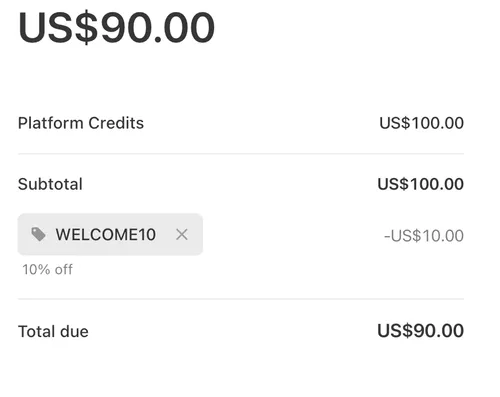
Example: You select $100 of credits and apply WELCOME10 (10% off). Stripe charges your card $90. Your account balance goes up by $100.
Applying a coupon
Section titled “Applying a coupon”-
Go to the billing page at console.aiand.com/settings/billing.
-
Click “Purchase Credits” and enter the amount you want to buy (e.g. $100).
-
Click “Purchase” — you’ll be redirected to Stripe’s secure checkout page.
-
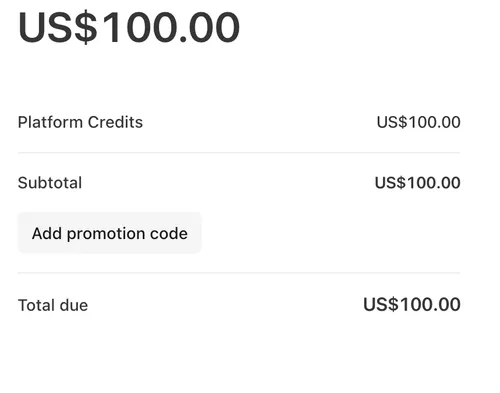
Click “Add promotion code” on the Stripe checkout page and enter your code.
-
Review the discount — Stripe will show the original amount, the discount, and the final total.
-
Complete payment. Once processed, your balance is credited with the full amount you selected.
Viewing applied coupons
Section titled “Viewing applied coupons”Your payment history on the billing page shows:
- Credits — the amount added to your balance
- Amount — what was actually charged to your card
- Coupon — the coupon code applied (if any)
Troubleshooting
Section titled “Troubleshooting”“The code you entered is invalid” — Coupons have usage limits and expiry dates. Double-check the code, or reach out to whoever sent it to confirm it’s still active.
“This code has expired” — The coupon’s validity period has ended. Contact the issuer for a new one.
“You’ve already used this code” — Some coupons are single-use per customer.
Questions?
Section titled “Questions?”If you have a coupon that isn’t working or need help, contact support@aiand.com.